
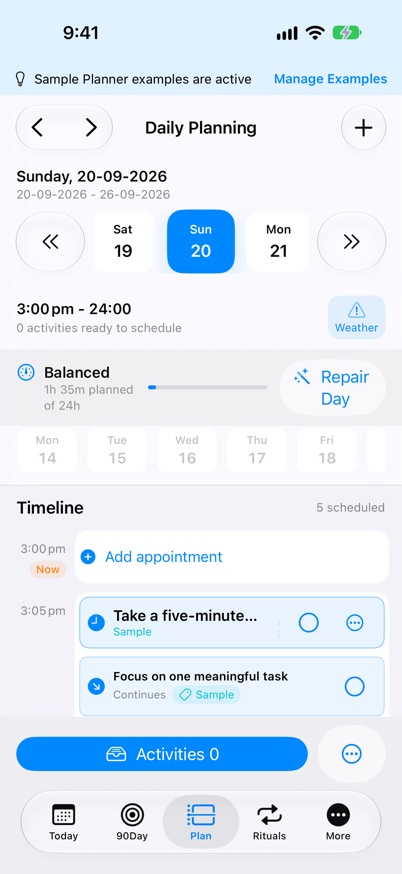
A flexible time-blocking reset
- Mark the commitments that genuinely need a time.
- Choose a small number of focus blocks for important work.
- Leave flexible actions unscheduled until a suitable gap appears.
- Keep open space between demanding or uncertain commitments.
- When the day changes, keep, move, shrink, or drop work deliberately.
Choose what deserves today before you place time blocks
What flexible time blocking means
Flexible time blocking is a way to protect time for important work without treating every task as a fixed appointment. A fixed commitment belongs at a particular time: an appointment, a meeting, a school pickup, or work that depends on someone else being available. A flexible action matters, but it can move within the day without breaking another commitment.
Time blocking becomes brittle when every task is treated as fixed. Place genuine anchors first, then decide which important actions deserve a block and which can remain available for a suitable gap.
Build the day from its anchors
Add the commitments whose timing is already decided. Include a realistic duration and notice the transitions around them, especially when travel, setup, recovery, or another person's timing is involved.
Leave some space unclaimed. A calendar filled edge to edge cannot absorb a late meeting, an urgent call, a longer-than-expected task, or the ordinary pause needed to change context.
Choose only the focus blocks that earn a place
Choose the few outcomes that matter most, then write the first startable action for each. Give a time block to work that benefits from protected attention rather than scheduling the whole task list by default.
In myDailyTasks, Daily Planner shows configurable half-hour slots and supports expected durations in five-minute increments. Unused time in a partly occupied half-hour remains available, so the plan can reflect the work more closely than a stack of identical blocks.
Keep a flexible list beside the timeline
An unscheduled list is not a failed schedule. It is a deliberate set of actions that can fit around the anchors without pretending their exact timing is already known.
The Daily Planner Task Queue keeps unscheduled tasks beside the timeline. Activities have separate controls and a separate allowance. Place flexible work around fixed commitments, then return a task to the queue when its time needs reconsidering.
Repair the plan when the day changes
Pause before filling the next available gap. Keep commitments that still need their time, move work that remains important but no longer fits, rewrite an action smaller when it is difficult to start, and drop work that no longer matters.
A saved task can move to another visible future date in Daily Planner. Returning a completed task to the queue keeps its completion and selected date while clearing its timeline time and time-dependent reminder. These are planning repairs, not reasons to duplicate the task.
Repair a day after an interruption
Imagine the plan contains a 10:00 am focus block to draft a quarterly summary, a fixed 4:00 pm dentist appointment, and flexible actions to book the vet, order supplies, and clear old downloads. A meeting overruns and removes most of the focus block.
Keep the dentist appointment because its time still matters. Shrink the report action to “outline the next section” so it can start in the remaining gap. Move the vet call to tomorrow if the clinic will be closed, order supplies only if a suitable gap appears, and drop the downloads cleanup from today's plan. The repair preserves what matters without copying every unfinished action into another crowded block.
Reset unfinished work at the end of the day
Review what was completed, what should move, and what can be removed. Automatic carryover can preserve unfinished work using the rules you choose, but it should not replace the decision about whether that work still belongs in the plan.
Use Weekly Review to look for repeated overfilling, unrealistic durations, or tasks that keep moving. Adjust the next week from that evidence instead of trying to make every individual day run exactly as planned.
Use the method without the app
The method works on paper or in any planner: draw a simple timeline for fixed commitments and selected focus blocks, then keep a separate flexible list. When something changes, make a conscious keep, move, shrink, or drop decision.
myDailyTasks represents the same method with a visible timeline, a Task Queue and separate Activities, task priorities, future-date moves, automatic carryover, and Weekly Review. The product is one way to apply the method, not a requirement for using it.