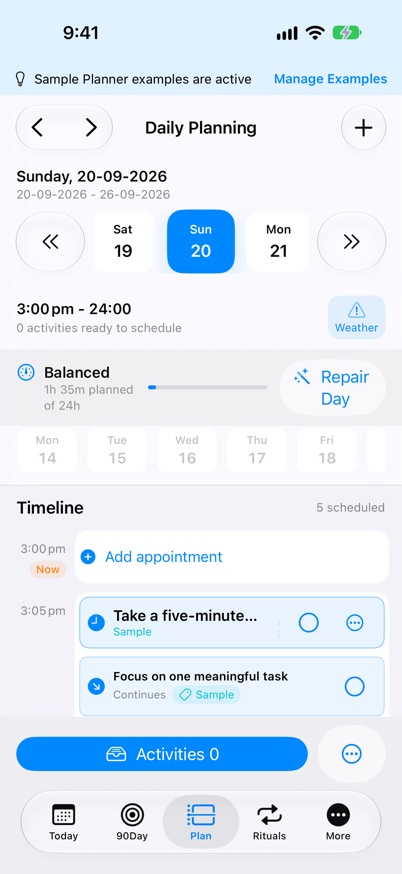
Daily Planner Timeline is a time-blocking view in myDailyTasks that places tasks and separate Activities onto a visible half-hour schedule on iPhone, iPad, and Mac.
Build 48 internal TestFlight: Next Task follows scheduled tasks in the displayed plan. An empty plan has no next task. Start records time, Pause stops that session, Review opens details, and Done follows your completion preference. Later requests a reminder ten minutes later without moving the task.
Client Work separates clients and projects with labelled headers and icons. Projects sit beneath their client, with tasks beneath each project; groups can be collapsed. Add to Time Slot uses the same hierarchy.
Daily Planner checks for local updates when opened or revisited. Imported iCloud changes refresh the open planner; Apple controls cloud transfer timing.
Next-build preview: weather text matches the neutral pollen detail colour. Calendar settings add Outlook setup guidance and a local connection check through Apple Calendar, without Microsoft Graph.
The Daily Planner view shows configurable half-hour slots for the selected day. Next-build preview: on Mac and iPad, the date strip starts with today followed by the next seven days; selecting another day keeps that range fixed. iPhone retains its compact date picker.
Unscheduled tasks appear in the Task Queue. Activities are separate planning items with their own controls and weekly allowance; both can be placed on the timeline.
Create appointments with an exact start time, duration, recurrence and optional one-way or return travel. Appointments stay on the timeline and are hidden from active task lists by default.
Populate My Day fits Work-associated tasks into configured work hours and personal tasks outside those hours or on non-work days. Choose 0–60 minute breaks between automatically placed work and commitments.
Selected system calendars appear as read-only commitments. Premium adds Optimise Day and event actions.
Plan Tomorrow is on by default: each evening it fills tomorrow with a realistic set of open tasks and breaks, using Apple Intelligence on device where available. Move or remove anything it adds.
Day Review compares the tasks planned for a day with those completed, including planned, completed and timed hours. An optional End of Day notification opens it each evening.
Today’s timeline opens at the current time. Weather and Pollen Alerts share one card, with tree, grass and weed levels beside the forecast on iPad and Mac.
Collapse Activities to keep the controls compact; each device remembers the choice. Duration and End Time stay in step for timed Activities.
Meal chips for Breakfast, Lunch, Dinner, and Snack can be dragged into the day without creating saved tasks first.
Scheduled cards reflect expected duration: tasks shorter than 30 minutes use a compact block, while longer tasks retain the larger standard presentation.
Expected durations use five-minute increments, and unused time in a partly occupied half-hour remains available for another task.
Task Queue cards show their scheduled date, using Today for the current date.
Returning a completed task to the Task Queue preserves its completion and selected date while clearing its timeline time and time-dependent reminder.
Move a saved task to another visible future date by dropping it on the date strip or choosing the date from its menu.
When one task spans several timeline blocks, choose whether to complete the selected block or the whole task.
Choose whether to show a local weather preview while planning your day.
Common questions about Daily Planner Timeline
What is Daily Planner?
Daily Planner is a time-blocking view that places open activities onto a visible half-hour schedule. You can drag tasks, appointments, and meal shortcuts into the day and adjust them as plans change.
Can myDailyTasks fill a work day automatically?
Yes. Populate My Day fits Work-associated tasks into configured work hours and personal work outside those hours or on non-work days, with optional breaks.
Can I move a task to another day from Daily Planner?
Yes. Move a saved task to a visible future date by dropping it on the date strip or choosing the date from its menu. Ritual occurrences keep their original date.
Do short tasks look different from longer tasks?
Yes. Scheduled tasks shorter than 30 minutes use a compact timeline block, while longer tasks keep the larger standard presentation. Durations still change in five-minute increments.
Keep going
Your next useful step
Continue with a related guide or explore how the feature fits your plan.
 myDailyTasksExplore Today