
myDailyTasks Face
A watch face setup built around today's tasks.
Use the Today's Tasks complication from myDailyTasks on Apple Watch faces that support complications. It shows your next open task, open count, and progress using the space available on the selected face.
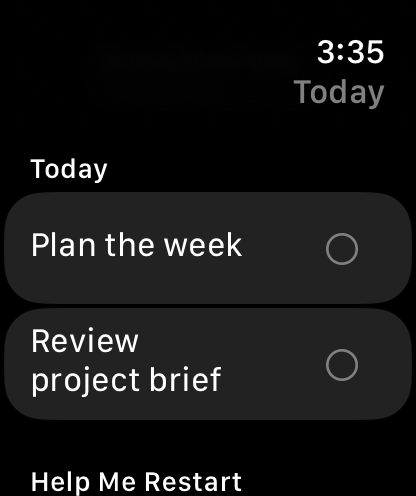
Current focus task on the wristOpen task count and progressCircular, corner, inline, and rectangular complication layoutsTap-through to Today in the watch app
Watch face setup
Configure a myDailyTasks face in a few steps.
You can add Today’s Tasks manually to a compatible face now. A ready-made face file is not available to download yet.
Manual setup availableCustomer download is not active yet
Use the setup guide below to choose a compatible face and add the myDailyTasks complication.
Open the setup guideSetup
Add myDailyTasks to a compatible Apple Watch face.
- Install myDailyTasks on Apple Watch.Keep the watch app signed in to the same Apple Account used on your iPhone for iCloud sync.
- Choose a face with complication slots.Most Apple Watch faces support at least one complication, with some offering several slots.
- Select the Today's Tasks complication.Use circular, corner, inline, or rectangular placement depending on the selected face.
- Tap the complication when you need detail.It returns to Today in the watch app so you can review or complete tasks quickly.
This is an Apple Watch face setup that uses the app's watchOS complication. watchOS controls the clock face, complication slots, colours, and supported layouts.