
New in version 1.2
Projects & Clients
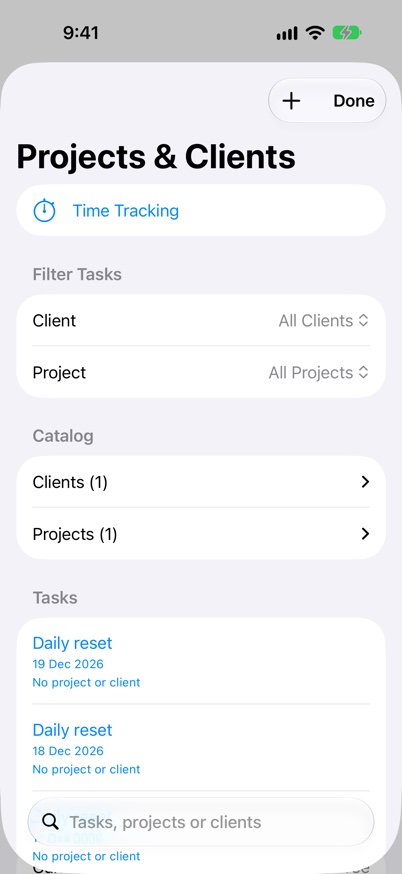
Connect tasks to the projects and people you work for, then see the time and billing for each client and project.
What it supports
- Build 48 internal TestFlight: switch Clients & Projects on or off in Settings > Projects & Clients. Turning it off hides organisation tools but preserves tasks, assignments and history; tasks remain in Task Queue. Watch has a separate switch in Display settings.
- Use Add Client, Add Project or Edit Details to manage client contact name, email, phone, address and notes, plus project description, status and notes. Save commits your changes; Cancel discards the draft.
- Assign a client and project in the task editor. Open Projects from Features on iPad and Mac, or More > Features on iPhone.
- See recorded, billable and amount totals for each client and project this week, month, year or all time, with charts of hours by project and by task.
- Add projects straight from a client’s page and set each project’s status: Active, On Hold, Completed or Archived.
- In Settings > Projects & Clients, bill each client hourly or daily, ex GST with an optional GST rate, and give any project a rate override and an hour budget that warns past 80% and when exceeded. Totals show the amount ex GST, the GST and the total inc GST.
- Review Unassigned Time to give sessions a client or project before billing. Archived clients and projects keep their history.
- Reuse and rename client and project labels without detaching their tasks. Filter assigned work across dates, including Daily Quest tasks.
- Open Time Tracking from the catalogue to review the time recorded against your work.
- Task assignments keep their identity when a task moves and are included in complete backup, merge, replacement and reset flows.
Keep going
Your next useful step
Continue with a related guide or explore how the feature fits your plan.