
New in version 1.2
Time Tracking
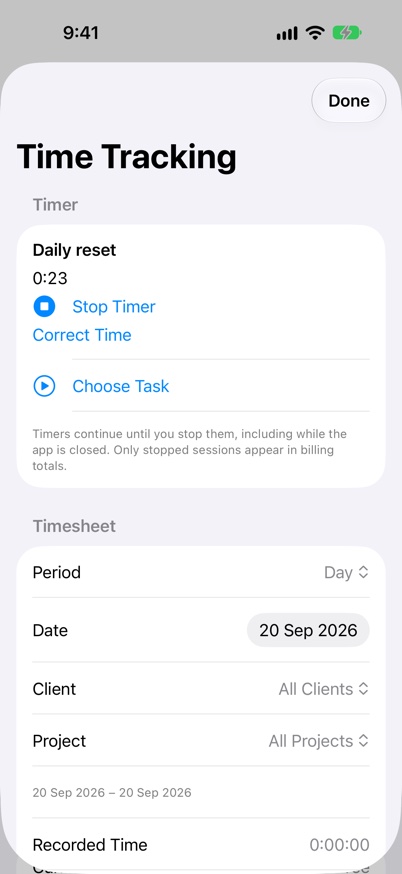
Record the time you actually spend on tasks, review your work by project, and export a timesheet when you need it.
What it supports
- See total tracked time at the top of a task’s timer, including its running session. Review and correct sessions with their full start and end times.
- Start and stop a task timer from Track Time, Today actions, or Time Tracking. A saved running timer continues across backgrounding and app relaunch.
- Next-build preview: optional Movement Reminders suggest Pause Tracking or Keep Going for a timer started on this device. They run only while the app is active, never stop work automatically, and still require physical-device acceptance.
- Movement Reminders are off by default, request sensor permissions explicitly and save no movement or location history. Keep Going postpones suggestions for 30 minutes; Watch tracking remains manual.
- Recorded time is separate from the task’s planned duration and completion. Stopping a timer does not mark a task done.
- Review day, week and month totals by client or project, mark sessions as billable, add notes and correct a forgotten timer.
- Only stopped sessions enter billing totals. Sessions crossing midnight split across local dates, and overlapping sessions are flagged for review.
- Export Timesheet CSV on iPhone, iPad or Mac with record identifiers, UTC intervals, hours and billable status. Billing history is retained when a task is reassigned or deleted.
- A dedicated Apple Watch Task Timer and complication require the latest Watch app; Premium is required to start a Watch timer.
Keep going
Your next useful step
Continue with a related guide or explore how the feature fits your plan.