
One day can contain several different lives
A work deadline, an assignment, a family appointment and a routine you want to keep can all land on the same Tuesday. Each matters, but each needs a different kind of planning. An appointment needs a protected time. An assignment needs several smaller steps. A routine needs a repeatable place in the week.
We created the additions in myDailyTasks 1.2 to help you manage more of those responsibilities together. The aim is a clearer picture of what needs attention, how much will fit, and what you can do next. You can start with the tools that solve a problem for you and leave the rest until you need them.
Bring study into the rest of your week
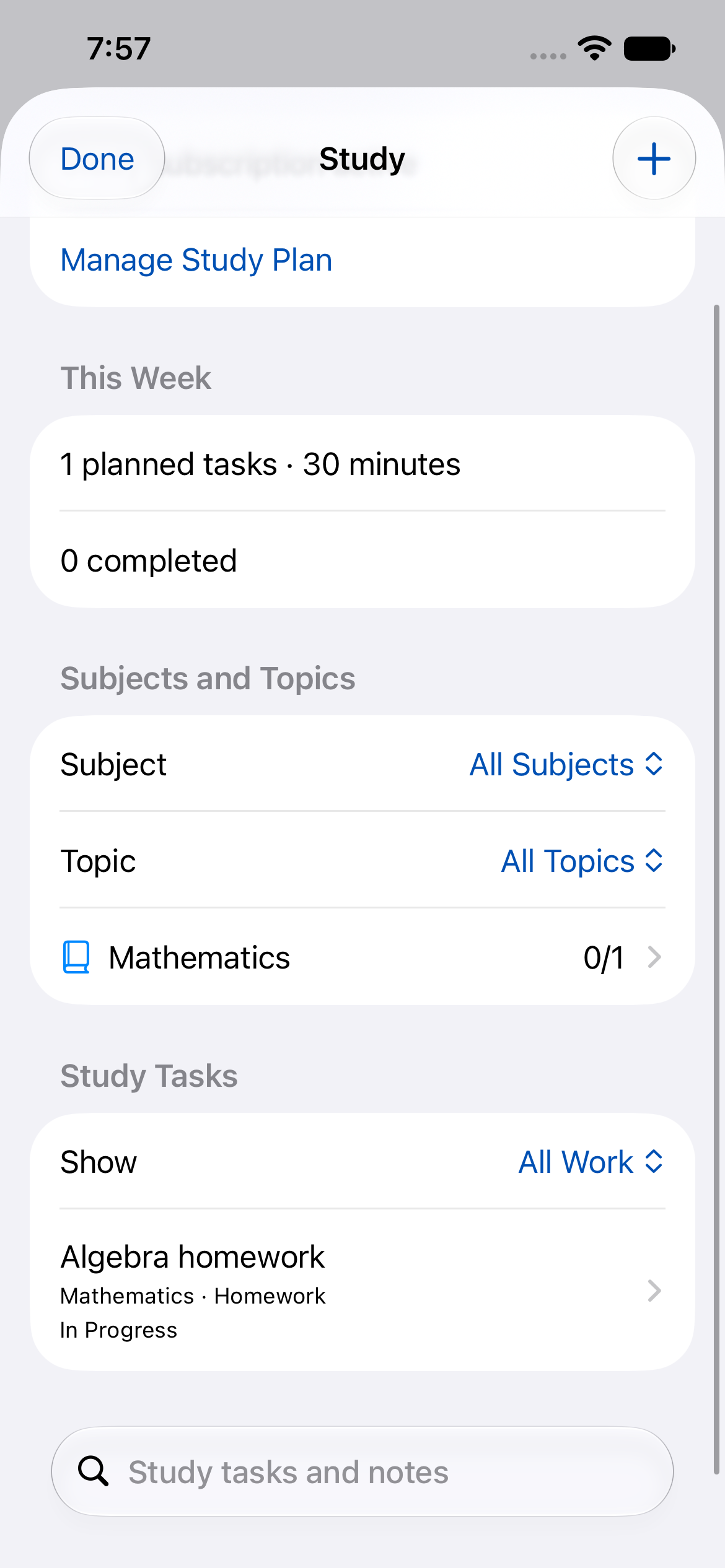
The new Study add-on organises subjects, topics, homework, assignments, exams and revision. Coursework appears in Study and the daily planner as the same task, so you can plan around work and home commitments without maintaining a second copy.
An assignment’s deadline stays separate from the date you intend to work on it. For a report due on Friday, you might plan research on Monday, an outline on Tuesday and a final check on Thursday. If Tuesday changes, move the outline session while keeping Friday’s deadline visible.
Assignment steps and study sessions make larger work easier to approach. Mark the parent assignment Submitted when you hand it in, then record a mark, grade or feedback when it arrives. Plan Follow-up Study opens a revision draft for you to review and save, giving feedback a practical next step.
Plan around the commitments already in your calendar
Connected calendars show selected commitments alongside your planning. Daily Planner lets you account for appointments, travel and flexible work, making it easier to notice when a day is already full.
Populate My Day, Plan Tomorrow and Optimise Day help with different planning decisions, and Day Review shows how the day went. Review proposed changes before applying them. Premium calendar tools also help you prepare for an event and organise its follow-up, while connected calendar events remain read-only.
Calendar Rules add important dates and away periods. Together, these tools help your plan reflect the week you have, including the days when you are away from your usual routine.
Understand where your work time goes
Time Tracking lets you run a task timer, review recorded time and export a timesheet CSV. Projects & Clients gives related work a home, while Search Tasks helps you find retained tasks across dates.
For example, you can group work for a client, record a session against a task and review the entry afterwards. Stopping the timer records time; completing the task remains a separate decision. That distinction helps when a useful session moves a project forward without finishing it.
Keep a useful next action close at hand
Apple Watch brings task access and capture to your wrist. The full dashboard, task timer and focus tools support moments when opening your phone would interrupt what you are doing. Help Me Restart lets you keep a smaller first step and an interruption note, so returning to work has a clearer starting point.
Watch focus countdowns and recorded task time serve different purposes. A focus session helps you stay with an activity; it does not automatically complete the task or add billable time. Display choices, transition reminders and compatible quick controls let you adapt the experience to your device and preferences.
On iPhone, iPad and Mac, Siri and Shortcuts offer another route into the planner. Ask Siri to open Today or add a task, or save a reusable shortcut for a familiar action. Widgets and the Mac menu bar provide quick access when you prefer a tap or click.
Give everyday routines a place too
Rituals support recurring responsibilities, while optional health connections help organise blood-pressure checks and medication routines. A completed checklist item remains different from a health measurement.
The Pollen Alerts add-on can create a reminder to follow your existing allergy medication plan when a fresh forecast for your chosen area is high or very high. It does not choose a medicine or dose. Forecast checks have a shared daily allowance and closed-app delivery is not guaranteed, so the feature supports your existing routine rather than replacing it.
Keep longer goals connected to today
Weekly Review helps you look back at completed and open work and decide what to change. Premium adds 12-week insights. Combine that perspective with your coursework, project time and upcoming commitments to choose a more realistic next week.
Start with one part of life you want to make easier
Try the optional Sample Planner if you would like to explore first. You can keep and personalise its examples or remove them together. Then choose one useful workflow: an assignment broken into steps, a client task with a timer, or a week planned around your calendar.
Free and Premium offer different limits and capabilities. The full Watch dashboard and some calendar tools require Premium. Study and Pollen Alerts are separate subscriptions; neither is included with Premium, and Study does not require it. The plan comparison and linked how-tos explain the choices without asking you to adopt everything at once.